On audio mastering #2

Last month I wrote a post about the art of mastering a song by adjusting its frequency bands through carefully analyzing the spectrogram, something I had never bothered to figure out before. Here’s that post.

Although I haven’t produced any new songs with Udio, because I’m trying to finish a novella I’ve been working on for seven goddamn months, I’m halfway through remastering the third volume of Odes to My Triceratops, which are a bunch of concept albums about a triceratops. I’ve changed how I master audio in subtle but powerful ways, so read on if you give a shit about this stuff.

  1. Download the WAV file of the song from the Udio interface.
  2. Open the original WAV in Audacity.
  3. Normalize both channels at -1db.
  4. Export it as a 24-bit/192KHz WAV stereo file. I read somewhere that you shouldn’t try to master audio using a WAV file of lower quality, and never ever using an MP3, which are compressed to begin with.
  5. Forget about Audacity and open a better audio editing program. I use iZotope RX 10, which is perfect for my purposes. Load the recently exported WAV file.
  6. Modify the EQ based on good base values (you can look up some and save it as a preset). Ensure that it comes with a high-pass filter at 30hz (roll off 24 db); apparently the human ear doesn’t hear anything below that frequency, so you’d just be leaving pointless data in.
  7. Normalize at -1db.
  8. Don’t bother with compression, multiband or not; I’ve come to believe that applying compression to a song is a crutch, because you can achieve similar but far better results by adjusting the individual frequency bands.
  9. Apply an azimuth operation on the song. It equalizes the volume of both channels and ensures that they are in sync, in case the audio came with some unsightly delay due to poor handling of mics. That won’t happen with Udio songs, but you might as well do so. However, blindly azimuth-ing a song can bite you in the ass: some parts of the song might only sound on one channel for artistic reasons, so ensure that you relisten to the whole thing afterwards. If the azimuth operation clearly shouldn’t have been applied to a specific segment of the song, revert the operation and only apply it to the rest of the song.
  10. Normalize at -1db.
  11. Now comes the fun part: messing around with frequency bands. iZotope RX allows you to set six manipulation points along the whole frequency spectrum. You should put each manipulation point smack in the middle of the following frequency ranges (you can prepare these manipulation points and save the set as a preset):
    • Bass (60-250 Hz)
    • Low Mids (250-500 Hz)
    • Midrange (500 Hz – 2 kHz)
    • Upper Midrange (2 kHz – 6 kHz)
    • Presence (6 kHz – 10 kHz)
    • Brilliance (10 kHz – 20 kHz)
  12. Go to your favorite part of the song and EQ each frequency band one by one, raising and lowering its volume little by little as you listen on your absolute best headphones. I own a pair of $400 noise-canceling headphones by Sony which do a fantastic job of isolating me from this horrid world.
  13. Notes on what raising or lowering each frequency band affects:
    • Bass (60-250 Hz): mostly the punch of drums, as well as similar instruments. I usually want them punchy, but it can distort the vocals if you go too high.
    • Low Mids (250-500 Hz): this is an interesting frequency band: too low and the voices and instruments will sound tinny, too high and the song will sound like mud. It features the “body” of many instruments.
    • Midrange (500 Hz – 2 kHz): mainly voices and guitar-like instruments.
    • Upper Midrange (2 kHz – 6 kHz): most of percussion that isn’t too bassy. This one is very easy to EQ for the entire song: raise and lower this frequency band until the pitch of the drums sounds right. If you raise it too high, some singers’ “S” sounds will hurt your ears.
    • Presence (6 kHz – 10 kHz): high lingering sounds like hi-hats, cymbals, and such. You can rarely raise or lower this much without altering the pitch of other percussion instruments, so I suggest very narrow frequency range manipulations in this range.
    • Brilliance (10 kHz – 20 kHz): this one is a bit hard to describe. Some call it “air,” similar to the sound your thumb and index finger make when you rub them together. It provides interesting details. A base EQ should likely raise this by about 8db. If you raise it further, it will likely screw with the pitch of the drums.
  14. Apply the EQ changes you prepared for your favorite part to the entire song. Particularly when working with Udio songs, it’s rare that the rest of the song requires very different EQ levels than your preferred part, so your changes act as a great new baseline.
  15. Go through each part of the song and apply individual changes to their frequency bands depending on that part’s needs: sometimes a segment should be more bassy, or the midrange be 3db higher because the guitar won’t sound as good otherwise, etc. However, ensure that you don’t screw up the transitions between the different segments of the song. This can easily happen if you raise the upper frequencies too much in one segment in comparison with the adjacent ones.
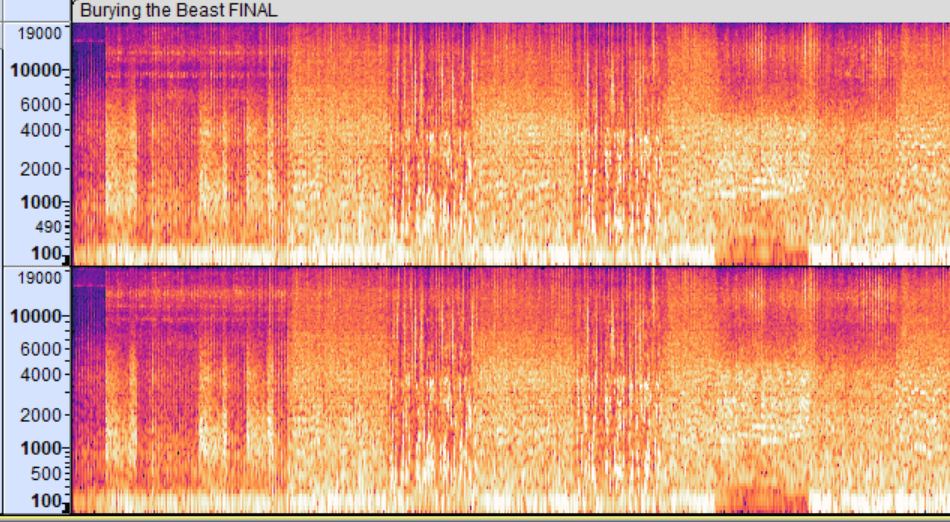
  16. When you’re happy with the state of the entire song, revise its spectrogram focusing on “instrument or vocal stripes” (not sure what to call them) that are either too white (meaning too loud in comparison to the rest of the spectrum) or not white enough (are buried in the mix).
  17. If you spot instrument stripes that are isolated between frequency bands, and that aren’t affected much by raising or lowering those manipulation points, hover your cursor over that line to figure out what frequency it’s located at. Then, move one manipulation point to that frequency and pinch the range of frequencies the manipulation will affect by scrolling with your mouse. This is a fantastic operation that I recently discovered. It that allows you to bring attention to isolated, perhaps even buried instruments like cowbell, ankle rattlers, tambourine, etc.
    • For example, in the images seen after this list, that solid strip in the “presence” frequency band is located at the 8100 Hz frequency, and is some sort of fancy percussion instrument. If you attempt to bring it further to the surface with a general manipulation point, you’ll distort the pitch of the drums.
    • Thankfully, in the EQ editor, as seen in the following picture, and as said before, you can narrow the breadth of the affected frequency range by scrolling with the mouse.
  18. Normalize at -1db.
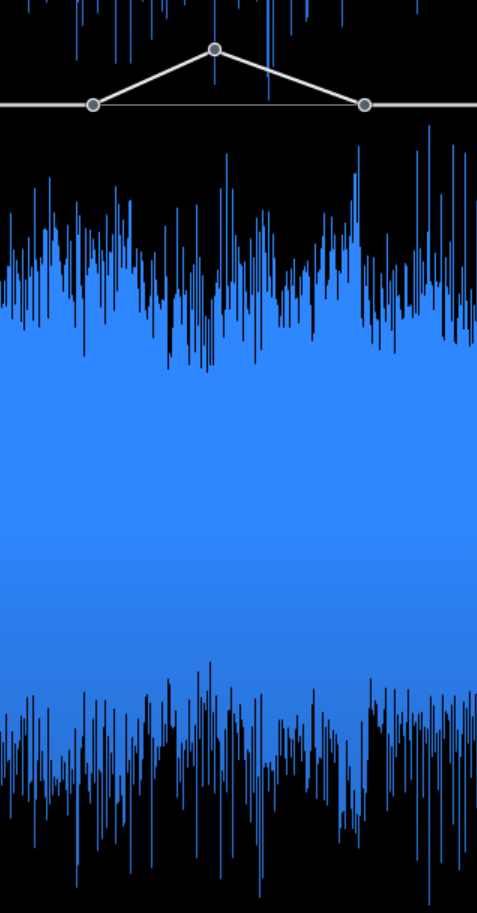
  19. Change the viewer from spectrogram to waveform. See those spikes in the corresponding image? Those spiky fuckers will be the bane of your life. A single protruding spike in the waveform will prevent the song from normalizing correctly, as it will adjust to the loudest millisecond of sound. I doubt that using some “limiter” operation is a good idea here, because you will shear part of the sound. I just carefully zoom into those parts, select the spike, and reduce its volume level with the Gain tool. You will likely need to do this dozens of times as you adjust the volume of the song.
  20. Use the clip gain tool, as seen in the corresponding image further down below, to properly raise or lower the volume of certain parts of the song. It’s usually a good idea to match the volume levels of all the song parts, but some do seem to need to sound lower. It’s a matter of taste.
  21. Finally, normalize at -1db.

Images for point 17:

Image for point 19:

Image for point 20:
Anyway, I hope this post helped if you’re also embarked on the marvellous journey of mastering songs. And if not, well, screw you.
Remastered “Go Away, Stay Away” from Odes to My Triceratops, Vol. 3

In the last post, I went on about my recent discovery of audio mastering techniques. It included my first remastered song whose band frequencies I had molested. Listening back, it was quite a mess. I decided that Audacity, instead of my abilities, was mainly responsible, so I acquired better audio editing software (namely iZotope RX, recommended by good ol’ castrated AI ChatGPT). Thanks to it, I have remastered the song “Go Away, Stay Away” into a version that I wouldn’t know how to improve anymore. Check it out.

I’d say it sounds quite polished. The trick this time was to pick a segment of the song as the “baseline” for frequency band manipulation, and from then on slightly altering the bands of other segments up and down, making sure that the leadings in and out of that segment didn’t clash with the change in frequencies.

Anyway, I’ve got seventeen goddamn other songs to master, and that’s just in this album. I should also return to writing my novella one of these days.

On audio mastering (and a remastered song)

As I was “remastering” the songs that make up the third volume of Odes to My Triceratops, I started thinking, “surely there’s fancier stuff to do to improve a finished song’s quality other than just messing around with its sound levels.” That ominous thought led me on a few days-long journey into the art of audio mastering. At one point, I opened one of my previous songs I thought finished, only to find out that the exporting process had clipped the hell out of it. I had no choice but to face that I had no fucking clue what I was doing.

Some reading later, along with help from ChatGPT, led me to the following steps to master a song:

  1. Normalize original WAV at -1db.
  2. Save original WAV as a 24-bit/192KHz WAV stereo file.
  3. Load exported WAV.
  4. High-pass filter at 30hz (roll off 24 db).
  5. Filter Curve EQ with preset (looked up good general values).
  6. Normalize at -1db.
  7. Apply multiband compression with the OTT plugin at 20% depth.
  8. Normalize at -1db.
  9. Split the stereo track and pan the channels to -70% and 70% respectively.
  10. Perform a thorough EQ check using the spectrum analyzer, adjusting frequencies along the way.
  11. Use the Limiter, Hard limit to -1 db to ensure the track doesn’t peak.
  12. Normalize at -1db.

Until a few days ago, I thought a spectrogram was a medical procedure. I mean, check out this shit. Does it look like something that makes any sense?

Turns out that you can learn lots from it. The frequency bands of a song are divided into the following:

Sub-bass (20-60 Hz)

Role: Provides the deep, rumbling foundation. It’s felt more than heard.
Boost: To add depth and power, typically in electronic music or certain genres of pop and hip-hop.
Cut: If the mix sounds too muddy or overwhelming, especially in more acoustic or vocal-focused tracks.

Bass (60-250 Hz)

Role: Adds warmth and fullness. Key for the body of bass instruments and the kick drum.
Boost: To give more weight to bass instruments, kick drums, and overall warmth. If the bass feels weak, a slight boost around 60-100 Hz can add more punch.
Cut: To reduce muddiness and allow other elements to breathe.

Low Mids (250-500 Hz)

Role: Important for the body of most instruments, but can often introduce muddiness.
Boost: To add body and presence to guitars, vocals, and other midrange instruments.
Cut: To clear up muddiness and create space in the mix.

Midrange (500 Hz – 2 kHz)

Role: Critical for the presence of most instruments and vocals. This range is highly sensitive to human ears.
Boost: To enhance clarity and presence of vocals and lead instruments.
Cut: If the mix sounds too harsh or congested.

Upper Midrange (2 kHz – 6 kHz)

Role: Contributes to the clarity and definition of sounds, especially for vocal intelligibility and instrument attack.
Boost: To add attack and clarity, making vocals and instruments stand out.
Cut: To prevent harshness and ear fatigue.

Presence (6 kHz – 10 kHz)

Role: Adds brightness and detail, crucial for the sense of “air” and openness.
Boost: To enhance the crispness and detail of vocals and percussion.
Cut: To soften overly bright or piercing sounds.

Brilliance (10 kHz – 20 kHz)

Role: Provides the sheen and sparkle that make a mix sound open and airy.
Boost: To add shimmer and airiness, particularly to cymbals and hi-hats.
Cut: To avoid excessive sibilance and hiss.

At a glance with a spectrogram, if there’s too much heat at a frequency band, you likely need to lower it. If another band presents a significant void, you can boost it and bring to the forefront little details that weren’t even present before. It’s quite amazing. Unfortunately, my obsessive attention to detail kicked in; the first time I tried to remaster “Burying the Beast,” I intended to go through each segment of the song boosting and lowering frequency bands to reach the optimal mix, but soon enough I was driven nuts. My job is already destroying me, I don’t need to work that hard in my spare time. So I fixed broad issues instead, boosting or lowering frequencies where it made sense.

I present to you the remastered version of fan favorite (for this fan, at least) “Burying the Beast,” a song from my album Odes to My Triceratops:

It isn’t perfect by any means, but it’s much better than the previous version, so that works for me.

Tips on producing songs with Udio

Some months ago a revolutionary AI tool came out: Udio. It allows you to produce professional-sounding songs. Although I know how to play the guitar, I’ve always been, as a systems builder, more interested in putting songs together than learning how to play an instrument, and I also rarely enjoy interacting with people, so dealing with human musicians was out of the question. Udio has allowed me to come up with about seventy-five songs, so at this point I think I’m qualified to give tips on this subject.

I only start thinking about the musical side of things when I have the lyrics ready. They tend to change very little during production: mostly to make them sound better or rhyme, if the opportunity arises. I also add little touches like laughs, comments, and vocalizations like “aah,” “yeah,” and such, which tend to make the song sound more natural.

As far as I’m concerned, the lyrics don’t need to be elaborate. I mostly focus on sentences that transmit a particular emotion. I admire complex, very carefully-written lyrics like Joanna Newsom’s, but they wouldn’t work for the kind of songs I’ve wanted to make so far.

Once the lyrics seem ready, I pinpoint the stanza that will determine the general style of the entire song. It’s usually the chorus (I don’t write multi-chorus songs, so that’s easier to determine for me), or at least the part of the song that needs to be nailed to fit your mental image. Udio uses structural tags to help the AI determine your intention: [hook], [chorus], [verse], [bridge], and such. I don’t think I have ever started a song with a segment that wasn’t a [hook] or a [chorus].

Apart from structural tags, Udio’s AI was trained with loads of “mood” tags. I have collected as many as I could, which is an ongoing process, and I have relied on ChatGPT to classify them. For example, under “musical qualities” and “abstract” I have the following to choose from: “cryptic, complex, existential, dense, glitch, abstract, generative music, improvisation, mashup, eclectic, lobit, microtonal, minimalistic, sampling, silence, sparse, tone poem, uncommon time signatures”. All these tags are functional, and manipulate the generation in appropriate ways.

I go through all these mood tags and, using the same seed for the generations, I produce some to get a feel for what I’d like the final song to sound like. More often than not, I don’t know what general genre the song will fall in. I base my choices on what my subconscious likes; an “I’ll know it when I see it” situation.

Once I’ve determined the mood of that particular segment, I go through my collection of instrument clips that I have painstakingly amassed from YouTube videos. Some time ago, I read through online lists of all the instruments in the world, then I determined which had matching tags in Udio. While pre-producing a song, I listen to each of those instruments one by one and let my subconscious decide if it would fit any of the stanzas. It’s a very painstaking process that usually takes about two hours, but it pays off in the end: the songs I have come up with would have been far less interesting otherwise.

Once I’m happy with the distribution of instruments, I go through a massive collection of genres, plenty of them bizarre (like psychobilly and cowpunk, two of my newly-discovered favorites), and ask Udio to generate loads of clips. If the style of an initial generation impresses me, I tag its name with its genre. If any of the generations is good enough that I would have gladly produced a whole song out of it, I mark it as “[name of song], Pt. 1 candidate.” If I end up with more than one candidate, but I’d rather discard them all but one, I pick the best, then I remix it by adding on top of it other genres whose associated generations had impressed me. That’s how I ended up with a mix of dance punk, surf rock, and cajun in “Paleontology of Pain.”

The best source I’ve found to learn more about genres is the fantastic site musicmap.info. You can zoom in on every supergenre, figure out how most genres relate to others, and listen to songs in those genres.

Once I’ve determined the best seed generation, always 33 seconds-long, the real fun starts: I extend that segment in both directions to render the rest of the lyrics. I keep prompt strength at 70% (forcing Udio to mostly obey my prompt, but giving it some room for improvisation), lyrics strength at 35% (it sounds more natural, allowing the singer to repeat some words or hallucinate as Udio sees fit), and generation quality obviously at ultra.

The context length is extremely important: the AI will only rely on what you allow it to see when deciding how to style the new generation, so don’t include in the context a part of the song that you wouldn’t want to “tint” the extension you’re working on.

Along the way, you may love some generation except for a few seconds where the singer blurted out gibberish, some instrument could have sounded better, etc. That’s where inpainting comes in: it patches over those parts without altering the rest of the song. Note, though: inpainting in general sounds worse than full generations, particularly the drums. No idea if that’s something that the team behind Udio will be able to improve, so if you can trim the part of the song you would have inpainted and request a full generation instead, do that.

When I’m happy with the full song, I download its wav file and open it in Audacity. Udio often screws up the sound levels, so I mess with them in Audacity until I’m happy with how the entire song sounds. Sometimes I screw it up myself and have to “remasterize” them because I have inadvertently produced clicks, which was particularly noticeable in the version I uploaded of “Synaptic Flies.” Editing a song easily takes up to an hour, or an hour and a half.

That’s about it. You can check out my albums here. I have two of them ready, and in a few days I’ll upload the third volume of Odes to My Triceratops. I hope you have learned something from my obsessive attention to detail, in case you’re into this bizarre business of putting together AI-generated music. And if you read this far even though you weren’t interested, don’t you have better things to do with your time?

On writing: My general rules

This post will include the rules I wished I had followed since I started writing seriously when I was sixteen years old. I will emphasize some points that my younger self resisted.

I shall update this post whenever I come up with something else valuable.


If your subconscious nudges you with some idea or imagery that feels important, determine if it falls into a piece you’re working on or that you intend to work on at some point. Pay special attention to the “seed ideas” that the subconscious rarely provides, and that emerge with such strength that you know in your bones they will sprout a full story. In those cases, stop whatever you’re doing and write down all the details that linger in your mind. Do not let those ideas go: they’re the best ones you will ever get. If you don’t write them down, you will end up forgetting them. Most of the favorite parts of my stories come from notes that I don’t remember having come up with nor written down.

If your mind presents you with some idea or imagery that feels important but can’t be assigned to any project, it’s not necessary to write it down. Plenty of these rogue suggestions resurface later, sometimes years later, tangled with other ideas or imagery that could be categorized. Let them simmer.

Your subconscious is the one entity in this world that you can fully trust. Like Cormac McCarthy put it, “[It has] been on its own for a long time. Of course it has no access to the world except through your own sensorium. Otherwise it would just labor in the dark. Like your liver. For historical reasons it’s loath to speak to you. It prefers drama, metaphor, pictures. But it understands you very well. And it has no other cause save yours.” Always pay attention to its advice.

As you work on a project, go through your notes for it with the goal of reordering them chronologically. If you aren’t sure about where in your story an event is supposed to take place, arrange them in order of escalating tension. Do this from time to time, because some notes will end up moving around significantly.

When you’re working on a scene or a chapter, go through your notes and isolate them in logical blocks that you should be able to coalesce in about five to ten minutes of freewriting. Add as many notes as necessary to that block so that you won’t need to know anything else about the rest of your story while you’re busy rendering that part of the scene.

Once that next block of the scene or chapter you’re working on contains all the necessary elements, render the block through freewriting. Do not ever sit down in front of your keyboard and try to come up with one word after another: that puts your conscious mind in control, the part of your brain that should only be in charge of putting together coherent sentences from raw material, and of revision. It will also end up making you hate the act of writing, which should be a labor of joy.

The way you force your subconscious to produce the raw material is through freewriting. Put on some mood-setting music, open videos and/or photos relevant to the block you will work on. I usually change the size of my windows in the PC to ensure that all the necessary parts fit on the screen at once. Then, while you play the notes in your mind as if they were part of a movie, type as fast as you can, coalescing what you’re sensing and feeling into a mass of raw material.

By “as fast as you can,” I literally mean it: banging your keys or repeating nonsense in case your brain can’t come up with some particular word, making enough grammatical and syntactic mistakes to make a teacher cry. Do not allow your fingers to stop. The goal is to bypass the slower conscious mind to access the much faster subconscious, the same way as you would while playing an instrument. You do not stop in the middle of playing a song because you don’t remember a specific note, or because you have just played the wrong one. If the end product of your freewriting session resembles the verbal diarrhea of a complete lunatic, then you’ve done it right: your subconscious isn’t sane, but it has survived for much, much longer than human beings have existed.

Once you end up with the raw material of a session of freewriting, let your conscious mind sieve through the outrageous nonsense, then arrange the fished-out meaningful words into coherent sentences.

Freewriting is also invaluable when you aren’t sure what details to produce out of a moment, or what feelings your point of view character would experience. Freewrite about it for a set amount of time, usually five minutes. In the process you will get the obvious out of the way, and your subconscious will provide some gems.

Beware the ladder of meaning. For example: entity > object > building > house > cottage > an English cottage with thatched roofs, a sprawling garden, and stone walls covered in ivy. Always try to include in your texts elements from the highest rung of the ladder of meaning. If you intend to include an element from lower rungs, justify its presence in the piece. Why would you mention an element that doesn’t warrant detailing?

If some sentence, or a whole paragraph, feels awkward, improve it until it doesn’t. If you can’t improve that element further and it still feels awkward, try to remove it from the text. If the text doesn’t start creaking, threatening to fall apart, leave that element out. If you have improved it to the best of your abilities and still feels awkward but you can’t take it out of the piece, forgive yourself and move on.

Do not ever leave in your story a sentence, or even a word, that’s not pulling its weight. Whatever you leave in that doesn’t need to be there detracts from the whole.

Base your sentences around specific nouns and vigorous verbs, both of which should generate imagery in your mind. Try to avoid forms of “to be” and “to have,” unless the alternative sounds more awkward.

Avoid clichés. A cliché is every single expression you have heard before. I don’t recall which books on writing said it, but it’s been proven that your brain doesn’t engage meaningfully with sentences it has read or heard a million times, the same way you don’t truly look at stuff you see every day. Your brain mainly reacts to surprise, in case it needs to fend off an attack. Your goal is to create something new with every sentence.

Show, don’t tell. What does that mean? When in doubt, ask “What’s the evidence of that?” If asking that question of a sentence or paragraph makes sense, then you’re telling. If it doesn’t, you’re showing. For example: “The woman was beautiful.” What’s the evidence that she’s beautiful? You’d go into specific details of her allure that would make your point of view character (important: not you) feel that she’s beautiful. And once you’ve added that explanation in, remove the sentence “The woman was beautiful.” You don’t need it.

You can violate any of the above rules if you’re going for a specific effect. For example, it’s not uncommon to use clichés (meaning any expression you’ve read or heard before) as part of your characters’ speech, because that’s what people do. You can also violate any of the above rules if the result would be funny.

Number one rule: offer the most meaning with the least amount of words. Don’t waste people’s time, starting with your own.